
Safeway Sign Up Rewards Program
There are two ways you can sign up for a Just For U Safeway store ⚡️ rewards card account: through the supermarket's official website and through a mobile app on your smartphone.
Sign Up For Safeway Card Online
The first way to sign up is to use the store's official website. For this, the customer will need access to the Internet and a personal computer or laptop. Follow the instructions to create an account:
- Go to the supermarket's official website
- In the upper right corner click on "Sign in"
- Choose "Create account" in the menu
- Fill in the form
- Click the button "Create account"
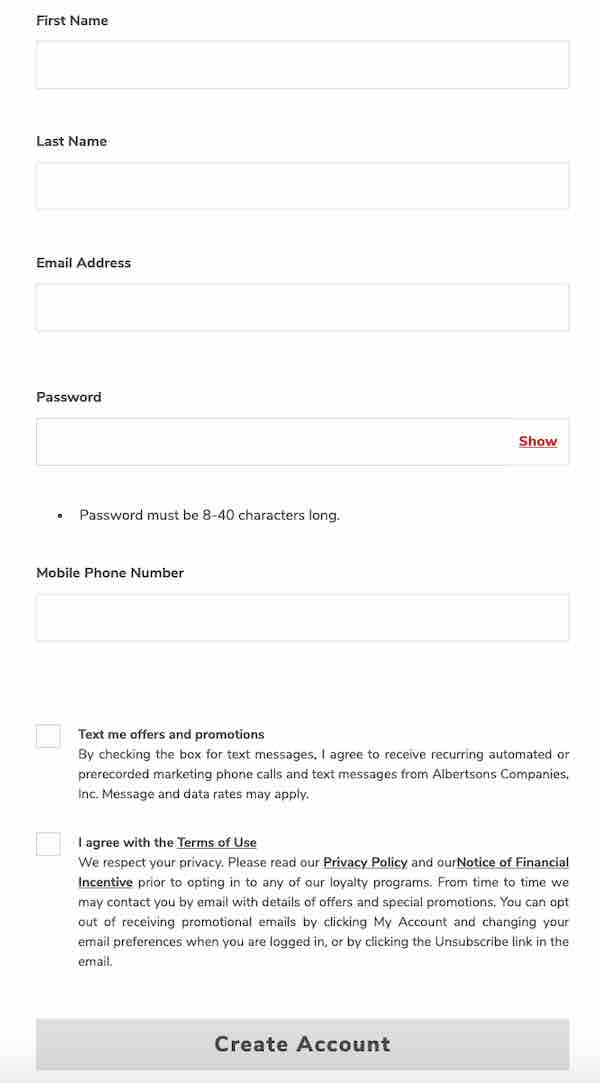
Important! When filling out the registration form the user needs to fill in all the fields with the actual data for this purpose you will need to specify: email, name and last name of the participant of the reward program, contact phone number. After that you should agree to the rules of the loyalty program participant.
Sign Up Safeway through Mobile App
The second method, which is available to all users, is to use the mobile application of the supermarket to register a new account.
You can download the app for free from the official app stores appStore and googlePlay - instructions on how to download the Safeway app . After you need to follow these steps:
- Install the app on your phone
- Start the application
- Press the "Create account" button
- Enter the data for registering an account
This procedure is performed only once, after which the user will only need to launch the mobile application on the smartphone to log in.
Rating